



If you have ever stood at the front of the room with a 3D model in your hands, a slide on the screen, and the feeling that you just want a little more guidance in the moment, you are not alone. Especially for educators who are newer to modeling or using a particular kit for the first time, it can be hard to know what to ask next, how long to pause, or which misconception to address without turning the lesson into a script.
Enhanced Teacher Notes were built for exactly this moment. They are designed to turn our slide decks into complete, ready-to-teach lesson plans while still leaving plenty of room for your own style, students, and storyline.
Why These Notes Exist
3D models can make invisible molecular structures and processes much more tangible
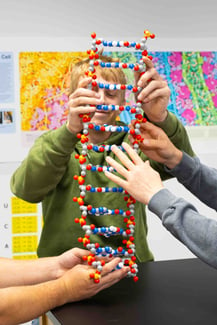 for students, but facilitating a full modeling sequence can feel daunting the first time you try it. Teachers asked for more support on what to say and do at each step, how to anticipate students' thinking, and how to build in quick formative checks without having to design everything from scratch.
Enhanced Teacher Notes grew directly from that feedback and from our WE2 Model pedagogy — Wonder, Explore, Explain — which guides how we design model-based lessons. The notes are intended to make this WE2 Model approach visible and usable, so that newer modeling educators can step into a sequence with more confidence.
What You Will Find Under Each Slide
Enhanced Teacher Notes live in the speaker notes section beneath each student-facing slide. They follow a consistent structure so that once you learn how to use them in one deck, it becomes easier to teach with the next one.
Across slides, you will see elements such as:
- Suggested time ranges to help you pace the lesson.
- Parallel teacher moves and student moves, showing what you might say or do and what students are expected to notice or record.
- Common misconceptions with concise clarification language you can use in real time.
- Model and visual references that tell you exactly when and how to put models, posters, or AR tools into students’ hands.
- Quick checks for understanding, along with simple “move forward” or “reteach” options.
- Additional notes that highlight NGSS connections, differentiation ideas, and extension opportunities.
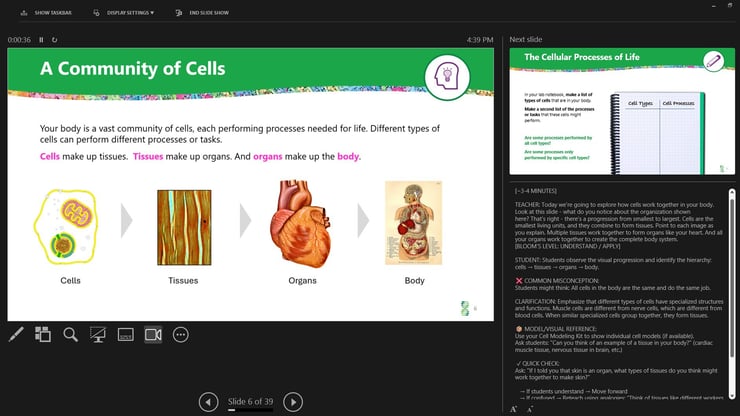 The intent is not that you read every note word for word. Instead, you can scan for what you need on a particular slide — background, a discussion prompt, a misconception to watch for, or a quick check — and use that to support your judgment in the moment.
Support, Not a Script
These decks and notes are not meant to be followed exactly as written. They are a starting point.
You can remove slides, reorder sequences, adjust questions, add a local phenomenon, or connect the activity to a storyline your students already know. For educators newer to modeling, that might mean leaning more heavily on the notes the first time you use a deck, then editing based on what you see in your classroom. Over time, your version of the deck becomes a co-authored resource: our WE2 Model-informed design plus your everyday teaching decisions.
How They Help in Different Lessons
This format is already built into several updated biology slide decks:
- Antibody Production and Cellular Processes explores how organelles work together to produce and release antibodies, with notes guiding you through each modeling step.
- Modeling Hemoglobin progresses from a patient story to red blood cell structure, globin folding, and a single amino acid change, with prompts that help newer users navigate the protein-structure storyline.
- DNA Replication (General Biology) helps students model nucleotides, strand directionality, replication enzymes, and fidelity, while the notes provide pacing support, address misconceptions, and connect to NGSS throughout.
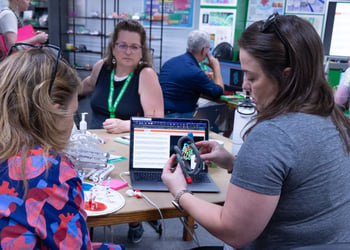
Across these decks, the same Enhanced Teacher Notes structure appears under the slides, even though the models and content differ. As additional resources are updated — such as future Flow of Genetic Information Kit© decks and related storylines — they will use this same format, so learning it once makes later decks more approachable.
How To Use Them
A simple way to think about Enhanced Teacher Notes is to use them before, during, and after class.
- Before class, skim the notes to understand the sequence and WE2 Model flow, gather the right
.jpg?width=350&height=233&name=DNA_Replication%20(1%20of%201).jpg) materials, and mark where you want to slow down or extend the discussion.
materials, and mark where you want to slow down or extend the discussion. - During class, keep the deck in presenter or notes view and glance at the notes for a question, a quick check, or a misconception to anticipate, while keeping your attention on students.
- After class, use the notes as a record of what you actually did. Mark where you changed timing, skipped a slide, or added your own prompts, and revise the deck so it fits your students even better next time.
In this way, the notes support your first use of a deck and also help you steadily tailor it to your own teaching context.
Where To Find Them
Enhanced Teacher Notes are currently integrated into:.jpg?width=300&height=200&name=Hemoglobin_Model%20(1%20of%201).jpg)
- Antibody Production and Cellular Processes.
- Modeling Hemoglobin.
- General Biology DNA Replication materials.
You can access them in the speaker or presenter notes view of your slide platform — the notes panel in PowerPoint, the speaker notes area in Google Slides, or Presenter Notes in Keynote.
New and updated decks will continue to use this same WE2 Model-based template so that the structure becomes familiar across resources.
Help Shape the Next Iteration
These Enhanced Teacher Notes are still new and intended to evolve with classroom use. Model Teachers have already reviewed them and see particular value for educators who are new to a kit or model, but broader feedback from your students and courses will help refine them further.
If you use one of these decks this year, consider letting us know:
- which questions or quick checks sparked the strongest discussions,
- where students still got stuck, even with the added support, and
- how you edited or adapted the notes for your grade level or storyline.
The aim is simple: to make it easier for educators to bring strong, flexible model-based biology lessons to their students, whether they are using a resource for the first time or the tenth.
.jpg?width=675&height=450&name=Teacher1%20(1%20of%201).jpg)